Qatar ID Check Online
Checking your Qatar ID (QID) is one of the simplest ways to confirm that your residency information remains accurate and valid. Your Qatar ID serves as the primary identity document for residents and supports access to government services, banking, healthcare, employment, education, telecommunications, and daily life across the country. A quick QID status check can confirm your residency validity, identify renewal requirements, and help prevent delays when using official services.
What is a Qatar ID (QID)?
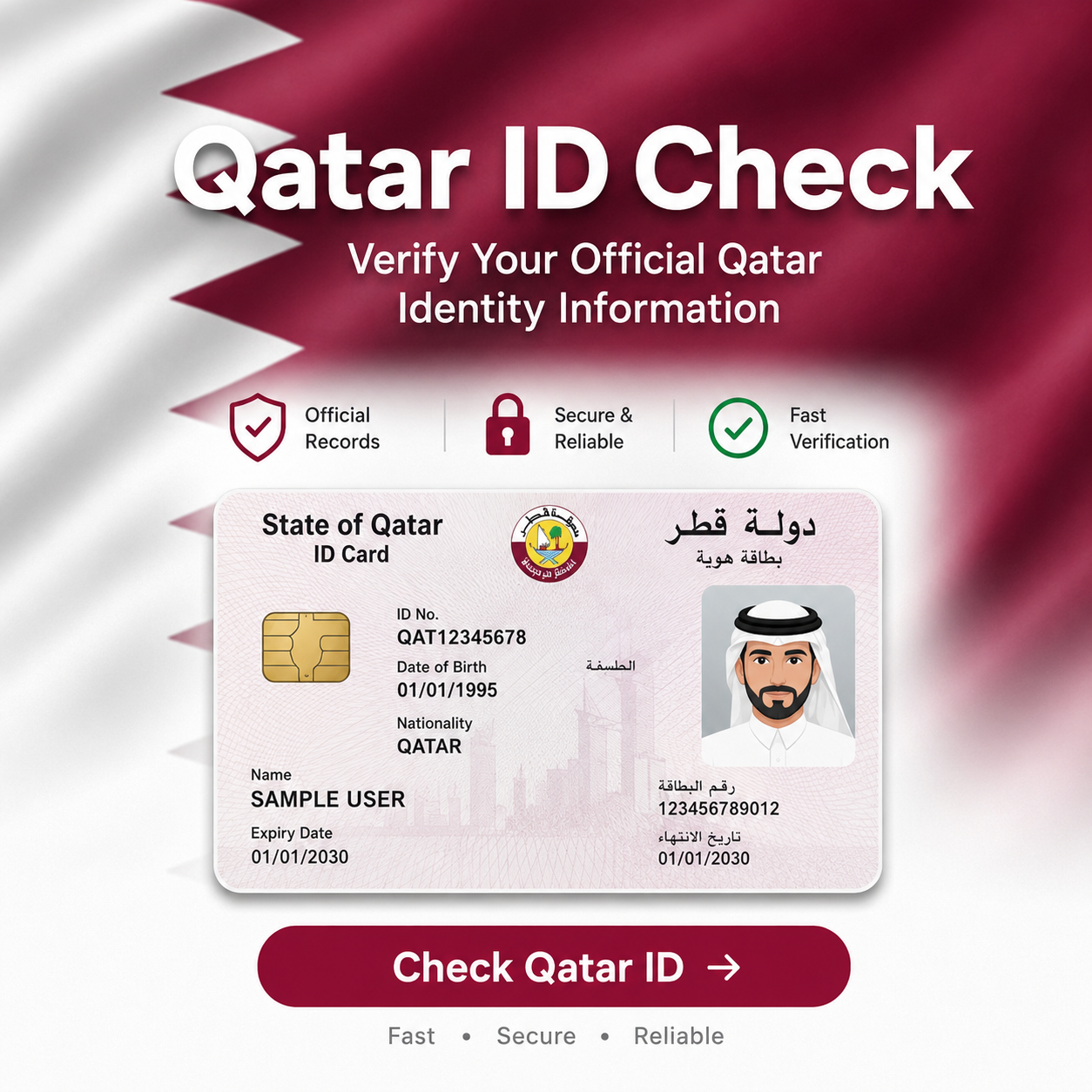
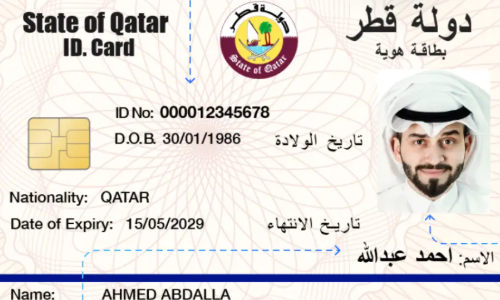
A Qatar ID, commonly called a QID, is the official identification card issued to residents by the Ministry of Interior (MOI Qatar). Every approved resident receives a unique identification number that remains linked to their immigration and residency records.
The QID acts as proof of legal residence in Qatar. Government departments, employers, financial institutions, hospitals, schools, and other organizations rely on it to verify a resident’s identity.
After a residence permit is approved, the Ministry of Interior issues the Qatar ID, allowing the holder to access a wide range of government and private services.
Why Is the Qatar ID Important?
The Qatar ID is more than an identity card. It serves as the official proof of residency issued by the Ministry of Interior (MOI Qatar) and acts as the primary document used to verify your legal status in the country. Government departments, employers, banks, hospitals, educational institutions, and service providers rely on the Qatar ID to confirm your identity before granting access to essential services.
Keeping your QID valid helps ensure uninterrupted access to government transactions and everyday activities. An expired or inactive Qatar ID can delay applications, restrict access to certain services, or require additional verification until your residency status is updated.
A valid Qatar ID is commonly required to:
Because the Qatar ID connects directly with your official residency record, checking its status regularly helps confirm that your information remains accurate, your residence permit is valid, and your government records are up to date. This simple check can prevent unexpected issues when using essential services or completing official procedures
Who Receives a Qatar ID?
The Ministry of Interior (MOI Qatar) issues a Qatar ID to individuals who receive legal residency approval under Qatar’s immigration and residence regulations. After a residence permit is approved, the resident becomes eligible for a Qatar ID, which serves as their official proof of identity and legal residence within the country.
Most expatriates living in Qatar receive a QID after completing the required immigration, medical examination, biometric registration, and residency procedures. The card remains linked to the holder’s residence permit and official government records throughout its validity period.
A Qatar ID may be issued to:
Who Does Not Receive a Qatar ID?
Visitors entering Qatar on a tourist visa, transit visa, or short-term visit visa generally do not receive a Qatar ID because they are not granted resident status. A QID is issued only after the appropriate residence permit has been approved by the Ministry of Interior.
When Is a Qatar ID Issued?
A Qatar ID is typically issued after the required residency process has been completed. This process may include:
Once issued, the QID becomes the resident’s primary identification document and is used for government services, banking, employment, healthcare, telecommunications, and other official transactions throughout Qatar.
Information Available on a Qatar ID
|
Information |
Description |
|
Qatar ID Number |
Unique identification number |
|
Full Name |
Official registered name |
|
Nationality |
Country of citizenship |
|
Date of Birth |
Resident’s birth date |
|
Gender |
Registered gender |
|
Expiry Date |
QID validity period |
|
Sponsor Information |
Employer or sponsor, when applicable |
6 Methods To Check Qatar ID
The official Ministry of Interior Qatar website provides the safest and most reliable method to verify Qatar ID information. Always use the official MOI portal instead of unofficial websites that request unnecessary personal information.
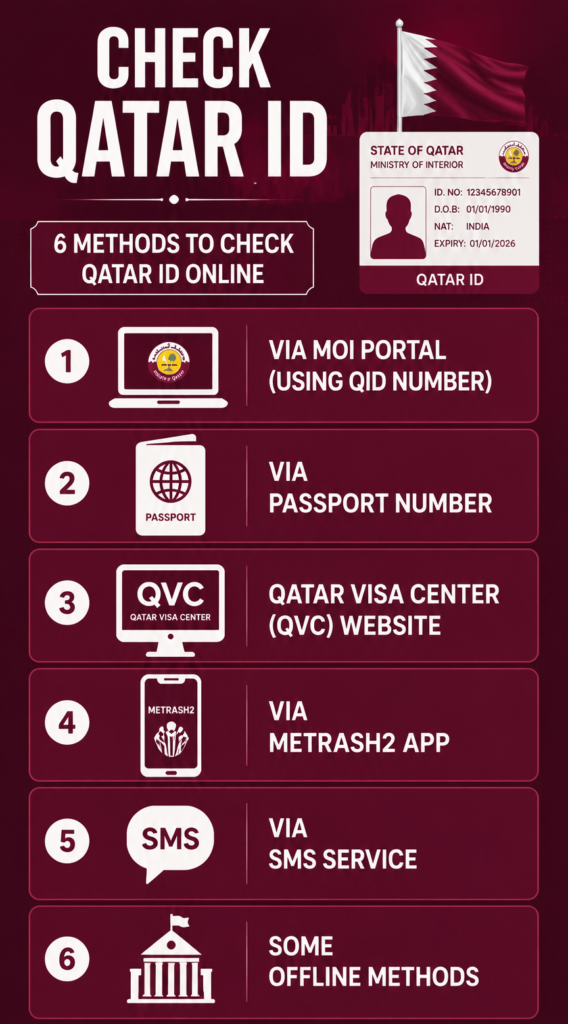
#1 Via MOI Portal (Using QID Number)
The Ministry of Interior (MOI Qatar) provides the official Official Documents Inquiry service, allowing residents to verify their Qatar ID information directly through the government portal. This is the safest and most reliable way to check your QID status, Qatar ID validity, residence permit details, and other official records.
Because the information comes directly from the Ministry of Interior database, it is generally more accurate than third-party websites. For security and privacy, always use the official MOI portal when checking your personal information.
Before You Begin
Prepare the following information before starting the inquiry:
The service is available on desktop computers, tablets, and smartphones without requiring additional software.
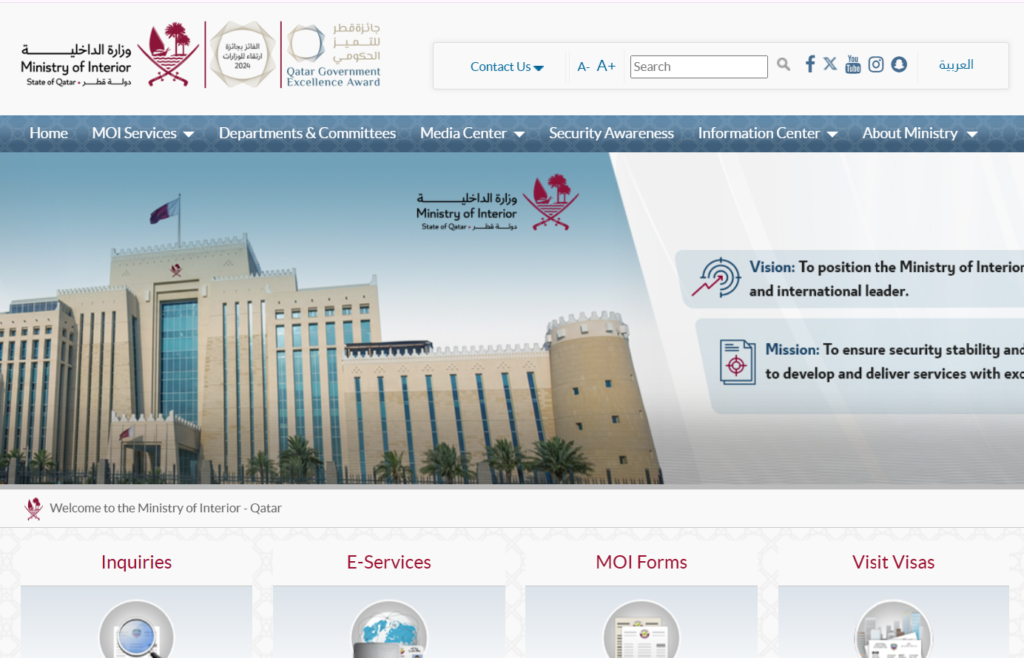
Step 1: Visit the Official MOI Qatar Website
Open your preferred browser and visit the official Ministry of Interior Qatar website. You can directly visit this website by following this URL(https://portal.moi.gov.qa/wps/portal/) and select the preferred lanague first as you shown in the image below.
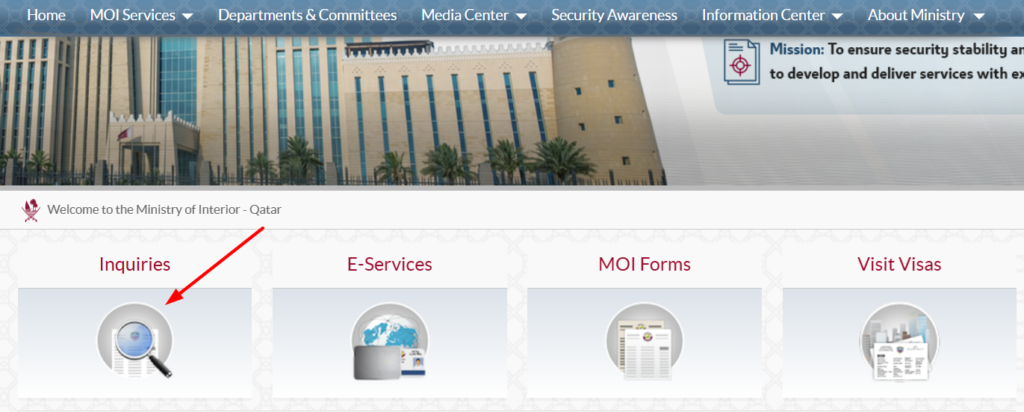
Step 2: Click on “Inquiries”
From the homepage, navigate to the Inquiries section, as you can see in the image. This service allows residents to verify information stored in the government’s official records.
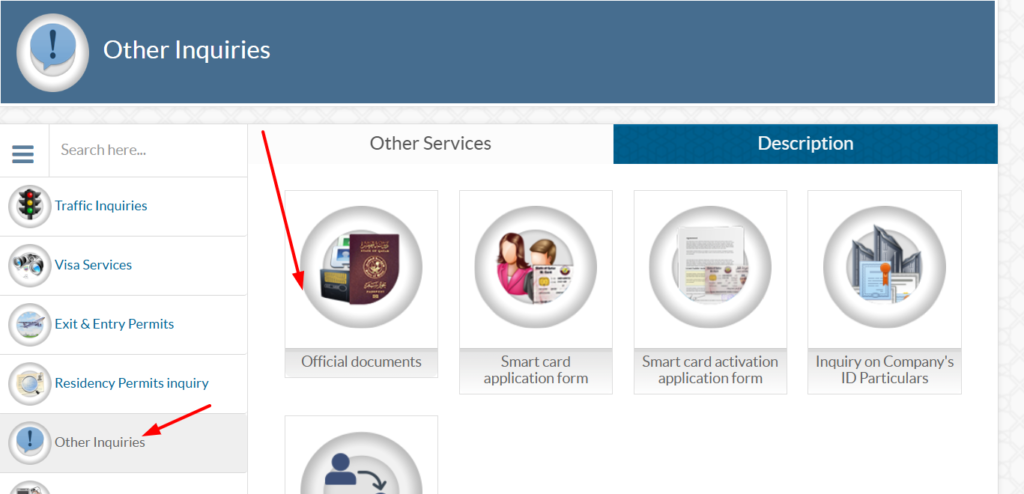
Step 3: Click on “Other Inquiries”
Once you click the inquiries option, you will see an option “Other Inquiries” on the left side of the page. After clicking this option, you will see the “Official Document” option on the right side of the page, as shown in the image below.
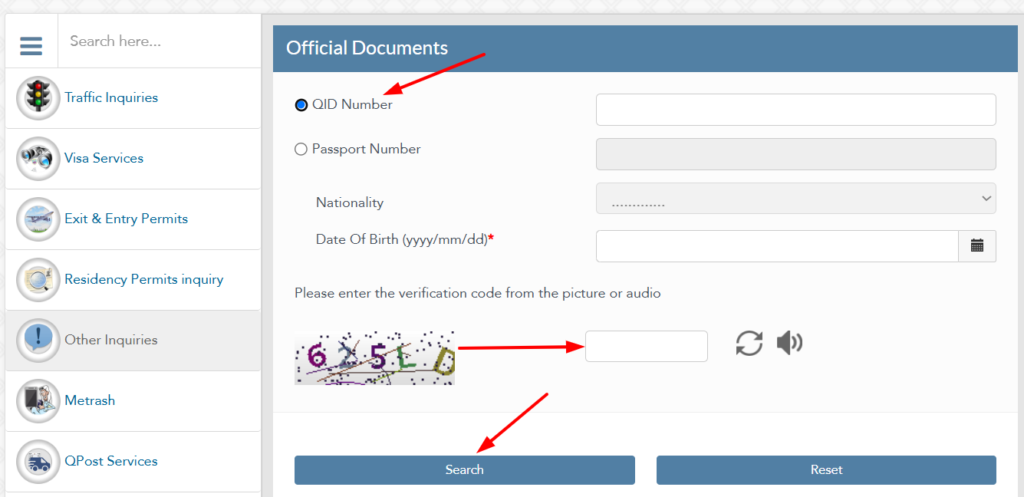
Step 4: Enter Your QID Number
Once you reach the official document page, you will see an option for QID Number. Thus, you need to enter a valid QID Number, fill in the captcha, and then click on the search option. You will instantly see your QID Status.
#2 MOI Qatar ID Check By Passport Number
If you don’t have your Qatar ID number, you can still check your Qatar ID using your passport number through the official MOI Qatar portal. This method provides quick access to residency-related information and helps you verify your identity using the details linked to your passport.
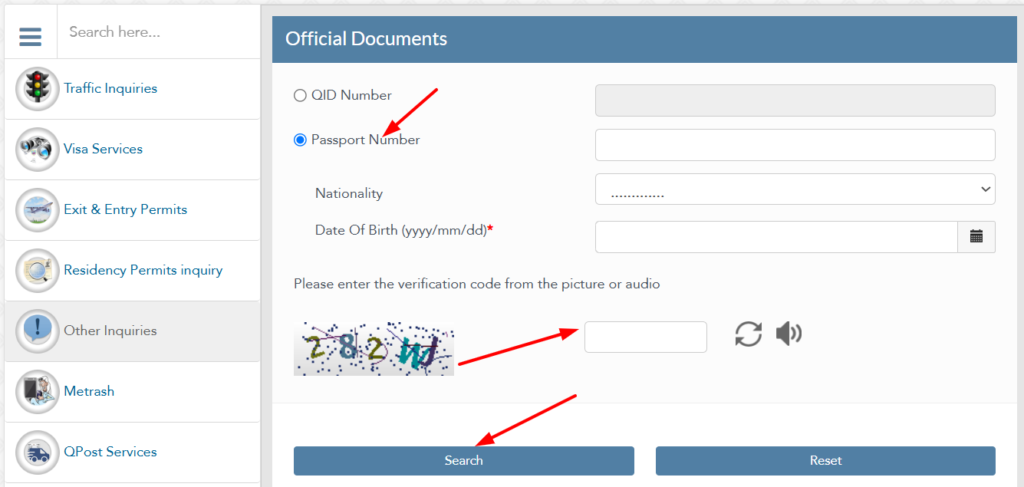
You have to repeat all the steps as given above for the QID number, but the last step is different. Instead of selecting QID Number, you have to select Passport Number. Enter your valid passport number, nationality, and DOB, fill in the captcha, and then click on the search button.
After the search is complete, review the information displayed on the screen. Depending on your record, the results may include:
Always compare the displayed information with your physical Qatar ID and other official documents. If you notice incorrect information, contact the Ministry of Interior or visit an authorized MOI Service Centre for assistance.
Information You Can Verify Through the MOI Portal
The Official Documents Inquiry service helps residents confirm several important details in one place.
|
Information |
Purpose |
|---|---|
|
Qatar ID Status |
Confirms whether your QID is active or inactive. |
|
Qatar ID Validity |
Shows whether your residency remains valid. |
|
Expiry Date |
Helps you plan renewal before the QID expires. |
|
Residence Permit Status |
Confirms the validity of your residency approval. |
|
Identity Details |
Verifies your registered personal information. |
|
Official Document Status |
Displays the latest record maintained by the Ministry of Interior. |
Why Use the Official MOI Portal?
The Ministry of Interior portal remains the most trusted source for checking Qatar ID information because it connects directly with official government records.
Key advantages include:
Best Practices for a Successful Qatar ID Check
Following a few simple precautions can help prevent common errors and ensure accurate results.
Common MOI Qatar ID Check Errors
Occasionally, the inquiry service may display an error message. Most issues can be resolved by checking your information or trying again later.
|
Error Message |
Possible Reason |
Recommended Solution |
|---|---|---|
|
Invalid Qatar ID |
Incorrect QID entered |
Re-enter the number carefully. |
|
Record Not Found |
Details unavailable or incorrect |
Verify your QID or wait if your record was recently updated. |
|
CAPTCHA Failed |
Incorrect security code |
Refresh the CAPTCHA and try again. |
|
Session Expired |
Page remained inactive |
Reload the page and submit a new request. |
|
Temporary Service Unavailable |
Scheduled maintenance or technical issue |
Wait a few minutes and try again. |
|
Website Not Loading |
Browser or internet issue |
Check your connection or use another browser. |
Is the MOI Qatar ID Check Secure?
Yes. The Ministry of Interior website uses official government systems to process inquiries. Your information is retrieved directly from government records rather than third-party databases.
For your privacy and security: