Qatar ID Check Online
Checking your Qatar ID (QID) is one of the simplest ways to confirm that your residency information remains accurate and valid. Your Qatar ID serves as the primary identity document for residents and supports access to government services, banking, healthcare, employment, education, telecommunications, and daily life across the country. A quick QID status check can confirm your residency validity, identify renewal requirements, and help prevent delays when using official services.
What is a Qatar ID (QID)?
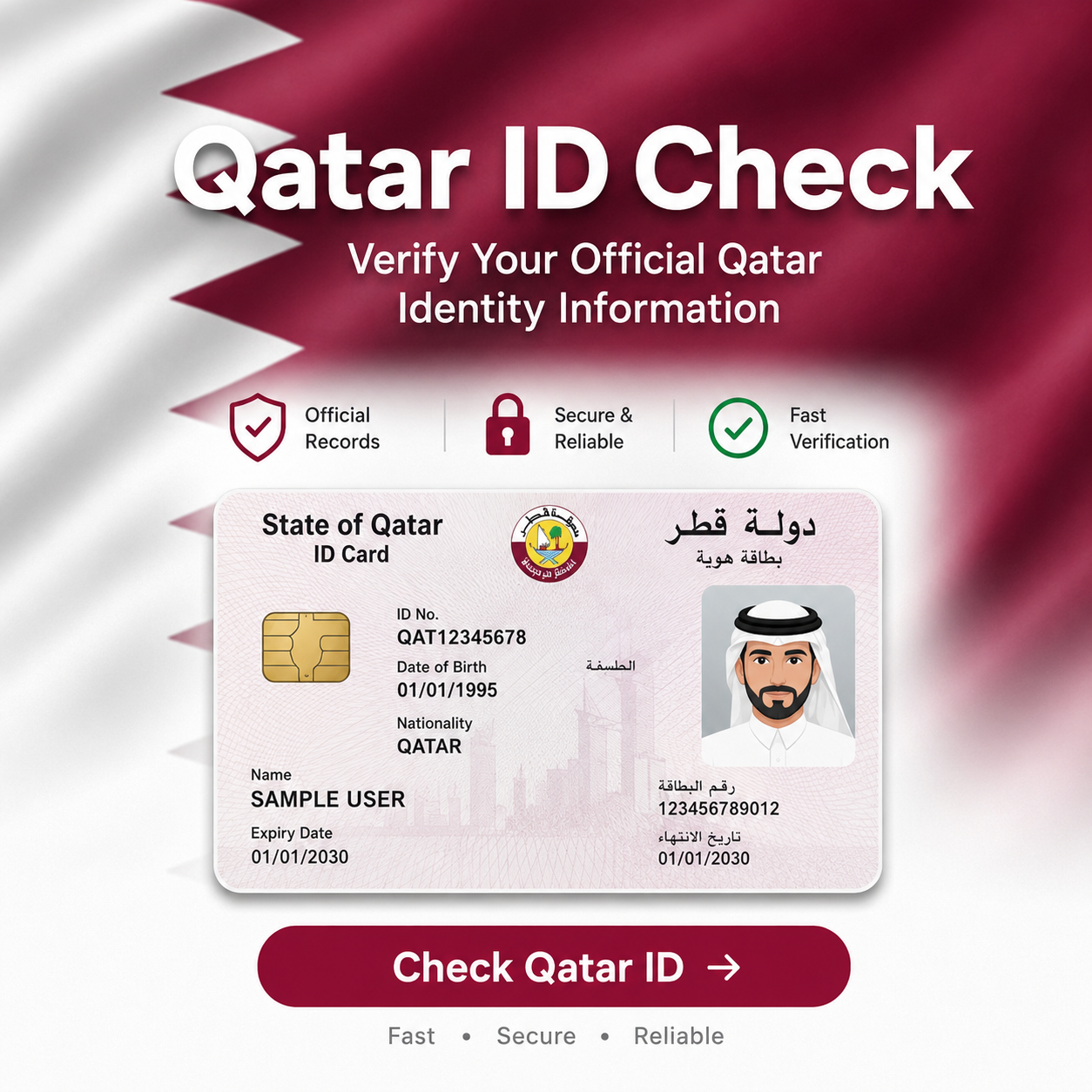
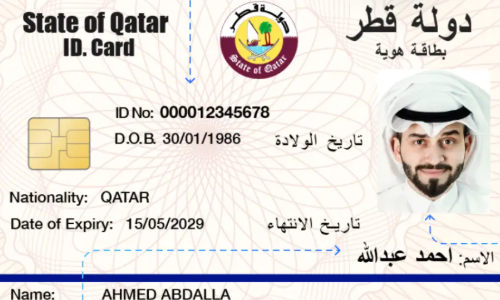
A Qatar ID, commonly called a QID, is the official identification card issued to residents by the Ministry of Interior (MOI Qatar). Every approved resident receives a unique identification number that remains linked to their immigration and residency records.
The QID acts as proof of legal residence in Qatar. Government departments, employers, financial institutions, hospitals, schools, and other organizations rely on it to verify a resident’s identity.
After a residence permit is approved, the Ministry of Interior issues the Qatar ID, allowing the holder to access a wide range of government and private services.
Why Is the Qatar ID Important?
The Qatar ID is more than an identity card. It serves as the official proof of residency issued by the Ministry of Interior (MOI Qatar) and acts as the primary document used to verify your legal status in the country. Government departments, employers, banks, hospitals, educational institutions, and service providers rely on the Qatar ID to confirm your identity before granting access to essential services.
Keeping your QID valid helps ensure uninterrupted access to government transactions and everyday activities. An expired or inactive Qatar ID can delay applications, restrict access to certain services, or require additional verification until your residency status is updated.
A valid Qatar ID is commonly required to:
Because the Qatar ID connects directly with your official residency record, checking its status regularly helps confirm that your information remains accurate, your residence permit is valid, and your government records are up to date. This simple check can prevent unexpected issues when using essential services or completing official procedures
Who Receives a Qatar ID?
The Ministry of Interior (MOI Qatar) issues a Qatar ID to individuals who receive legal residency approval under Qatar’s immigration and residence regulations. After a residence permit is approved, the resident becomes eligible for a Qatar ID, which serves as their official proof of identity and legal residence within the country.
Most expatriates living in Qatar receive a QID after completing the required immigration, medical examination, biometric registration, and residency procedures. The card remains linked to the holder’s residence permit and official government records throughout its validity period.
A Qatar ID may be issued to:
Who Does Not Receive a Qatar ID?
Visitors entering Qatar on a tourist visa, transit visa, or short-term visit visa generally do not receive a Qatar ID because they are not granted resident status. A QID is issued only after the appropriate residence permit has been approved by the Ministry of Interior.
When Is a Qatar ID Issued?
A Qatar ID is typically issued after the required residency process has been completed. This process may include:
Once issued, the QID becomes the resident’s primary identification document and is used for government services, banking, employment, healthcare, telecommunications, and other official transactions throughout Qatar.
Information Available on a Qatar ID
Information | Description |
Qatar ID Number | Unique identification number |
Full Name | Official registered name |
Nationality | Country of citizenship |
Date of Birth | Resident’s birth date |
Gender | Registered gender |
Expiry Date | QID validity period |
Sponsor Information | Employer or sponsor, when applicable |
6 Methods To Check Qatar ID
The official Ministry of Interior Qatar website provides the safest and most reliable method to verify Qatar ID information. Always use the official MOI portal instead of unofficial websites that request unnecessary personal information.
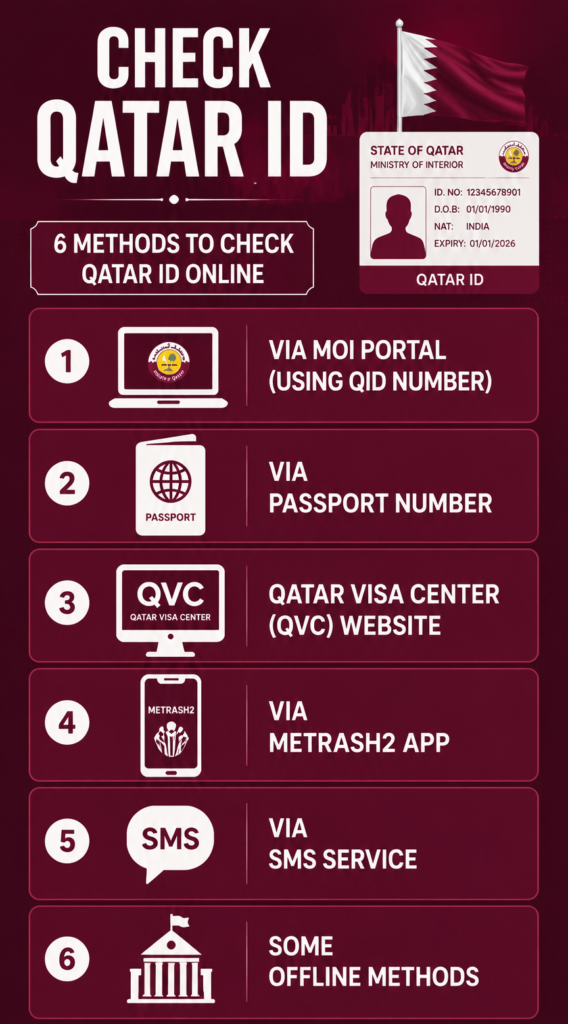
#1 Via MOI Portal (Using QID Number)
The Ministry of Interior (MOI Qatar) provides the official Official Documents Inquiry service, allowing residents to verify their Qatar ID information directly through the government portal. This is the safest and most reliable way to check your QID status, Qatar ID validity, residence permit details, and other official records.
Because the information comes directly from the Ministry of Interior database, it is generally more accurate than third-party websites. For security and privacy, always use the official MOI portal when checking your personal information.
Before You Begin
Prepare the following information before starting the inquiry:
The service is available on desktop computers, tablets, and smartphones without requiring additional software.
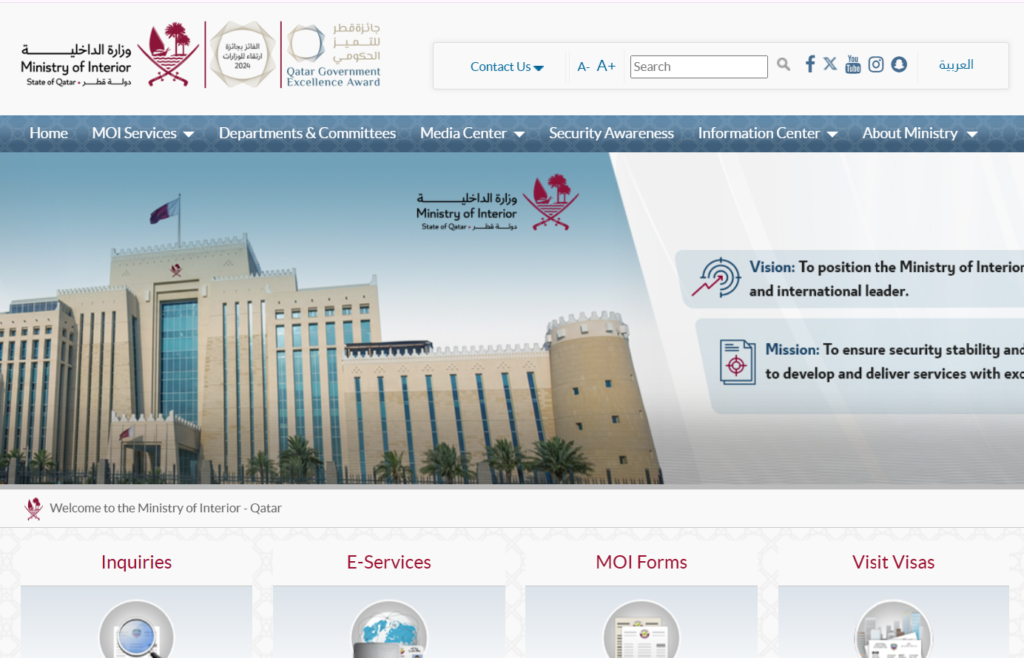
Step 1: Visit the Official MOI Qatar Website
Open your preferred browser and visit the official Ministry of Interior Qatar website. You can directly visit this website by following this URL(https://portal.moi.gov.qa/wps/portal/) and select the preferred lanague first as you shown in the image below.
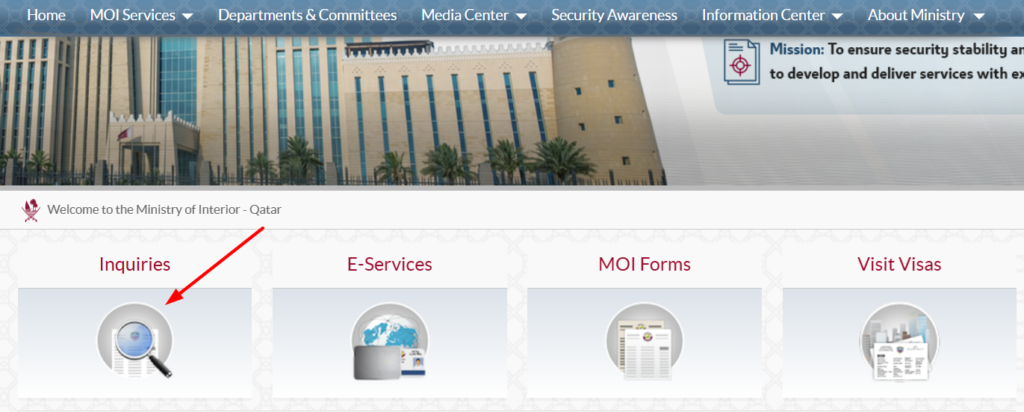
Step 2: Click on “Inquiries”
From the homepage, navigate to the Inquiries section, as you can see in the image. This service allows residents to verify information stored in the government’s official records.
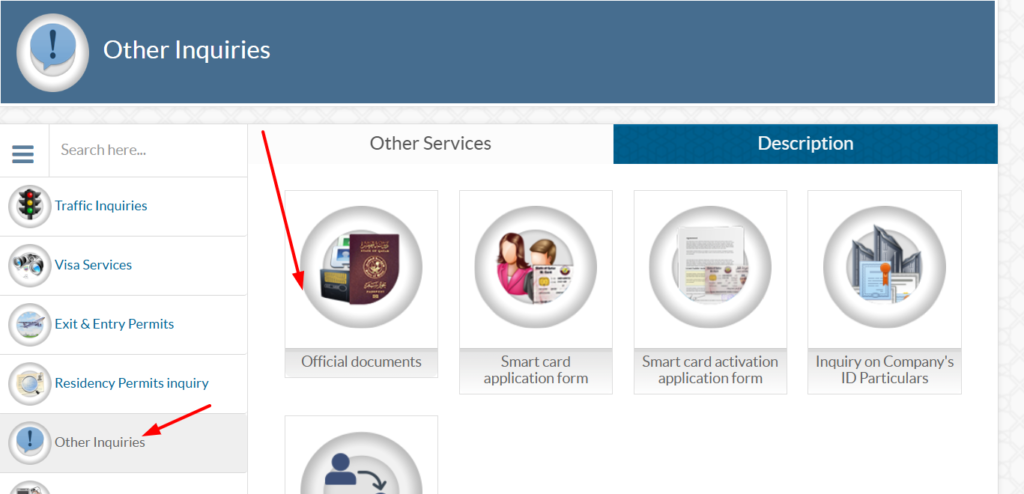
Step 3: Click on “Other Inquiries”
Once you click the inquiries option, you will see an option “Other Inquiries” on the left side of the page. After clicking this option, you will see the “Official Document” option on the right side of the page, as shown in the image below.
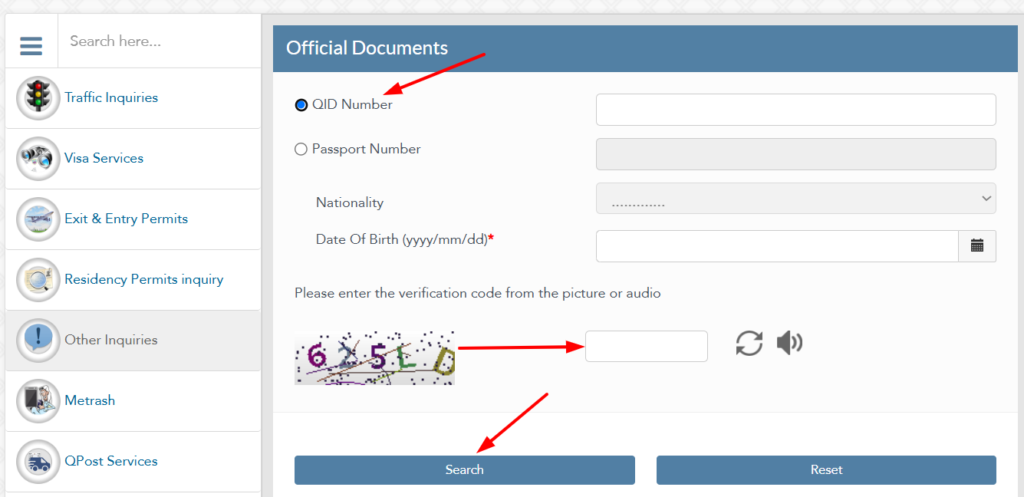
Step 4: Enter Your QID Number
Once you reach the official document page, you will see an option for QID Number. Thus, you need to enter a valid QID Number, fill in the captcha, and then click on the search option. You will instantly see your QID Status.
#2 MOI Qatar ID Check By Passport Number
If you don’t have your Qatar ID number, you can still check your Qatar ID using your passport number through the official MOI Qatar portal. This method provides quick access to residency-related information and helps you verify your identity using the details linked to your passport.
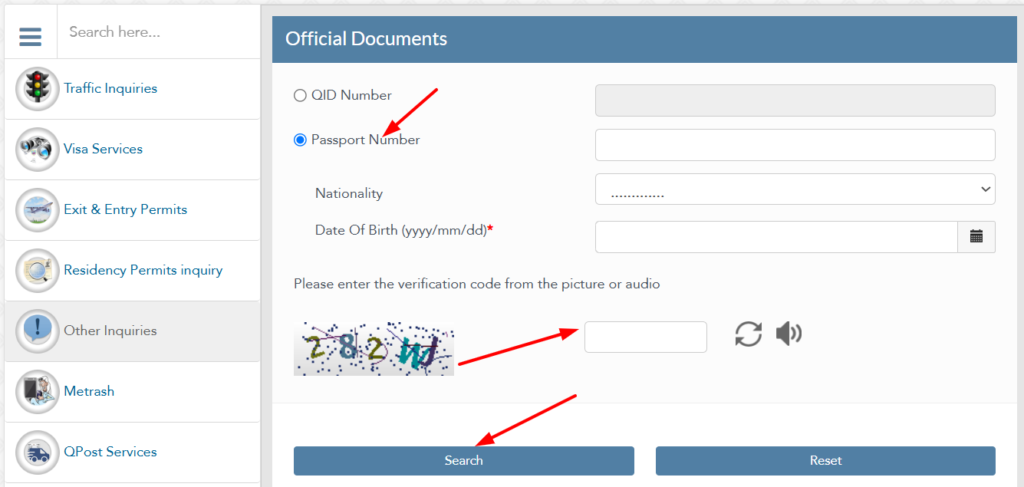
You have to repeat all the steps as given above for the QID number, but the last step is different. Instead of selecting QID Number, you have to select Passport Number. Enter your valid passport number, nationality, and DOB, fill in the captcha, and then click on the search button.
After the search is complete, review the information displayed on the screen. Depending on your record, the results may include:
Always compare the displayed information with your physical Qatar ID and other official documents. If you notice incorrect information, contact the Ministry of Interior or visit an authorized MOI Service Centre for assistance.
Information You Can Verify Through the MOI Portal
The Official Documents Inquiry service helps residents confirm several important details in one place.
Information | Purpose |
|---|---|
Qatar ID Status | Confirms whether your QID is active or inactive. |
Qatar ID Validity | Shows whether your residency remains valid. |
Expiry Date | Helps you plan renewal before the QID expires. |
Residence Permit Status | Confirms the validity of your residency approval. |
Identity Details | Verifies your registered personal information. |
Official Document Status | Displays the latest record maintained by the Ministry of Interior. |
Why Use the Official MOI Portal?
The Ministry of Interior portal remains the most trusted source for checking Qatar ID information because it connects directly with official government records.
Key advantages include:
Best Practices for a Successful Qatar ID Check
Following a few simple precautions can help prevent common errors and ensure accurate results.
Common MOI Qatar ID Check Errors
Occasionally, the inquiry service may display an error message. Most issues can be resolved by checking your information or trying again later.
Error Message | Possible Reason | Recommended Solution |
|---|---|---|
Invalid Qatar ID | Incorrect QID entered | Re-enter the number carefully. |
Record Not Found | Details unavailable or incorrect | Verify your QID or wait if your record was recently updated. |
CAPTCHA Failed | Incorrect security code | Refresh the CAPTCHA and try again. |
Session Expired | Page remained inactive | Reload the page and submit a new request. |
Temporary Service Unavailable | Scheduled maintenance or technical issue | Wait a few minutes and try again. |
Website Not Loading | Browser or internet issue | Check your connection or use another browser. |
Is the MOI Qatar ID Check Secure?
Yes. The Ministry of Interior website uses official government systems to process inquiries. Your information is retrieved directly from government records rather than third-party databases.
For your privacy and security:
#3 How to Check QID Status Using Metrash
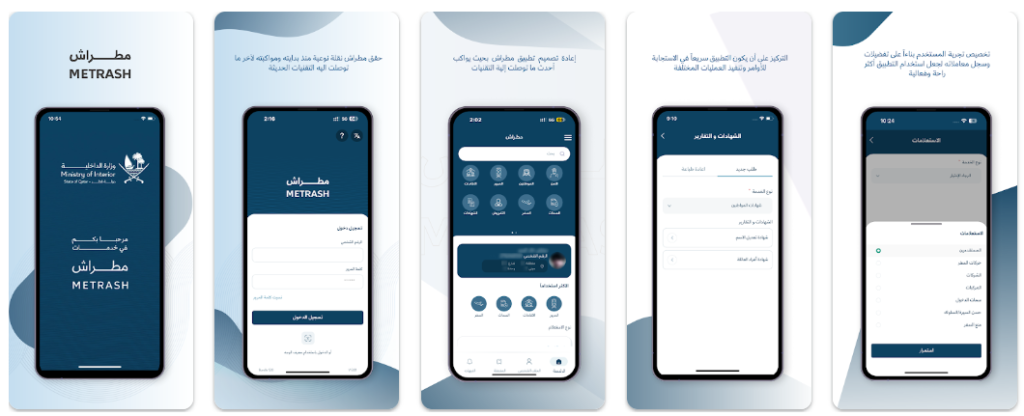
Metrash is the official mobile application developed by the Ministry of Interior Qatar. It allows residents to complete a wide range of government services directly from their smartphones.
In addition to checking QID status, Metrash supports document management, notifications, selected residency services, and other official transactions.
What Is Metrash?
Metrash is a secure government application that connects directly with MOI systems. Residents use it to manage several services without visiting a Ministry of Interior service centre.
Depending on account permissions, available services may include:
Requirements Before Using Metrash
Before accessing services, ensure that:
Step 1: Download Metrash App
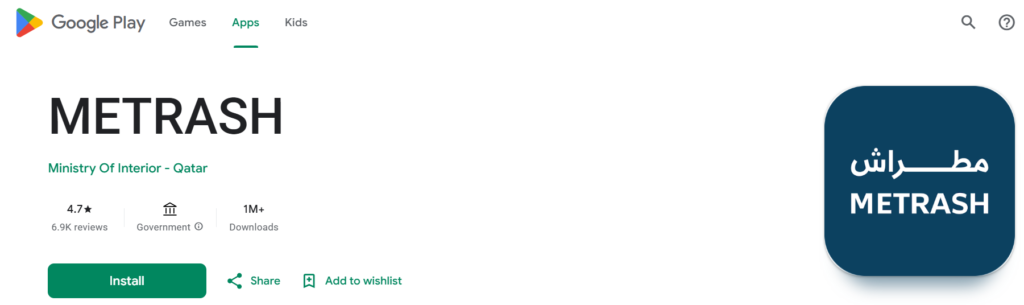
Before using this application, you have to download its official app from the Google Play Store. You can download the app by following this URL (https://play.google.com/store/apps/details?id=qa.gov.moi.metrash&hl=en)
Step 2: Login
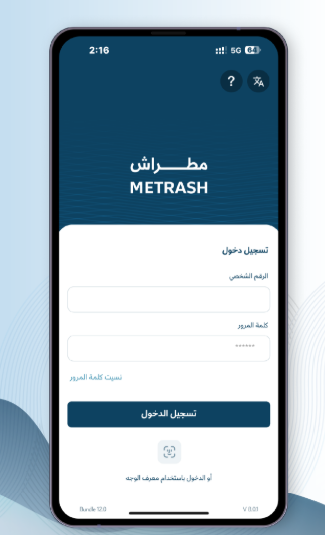
Open the Metrash app and sign in using your registered Qatar ID (QID) and password. If you’re using the app for the first time, complete the registration process first, then log in to access your account and check your Qatar ID status.
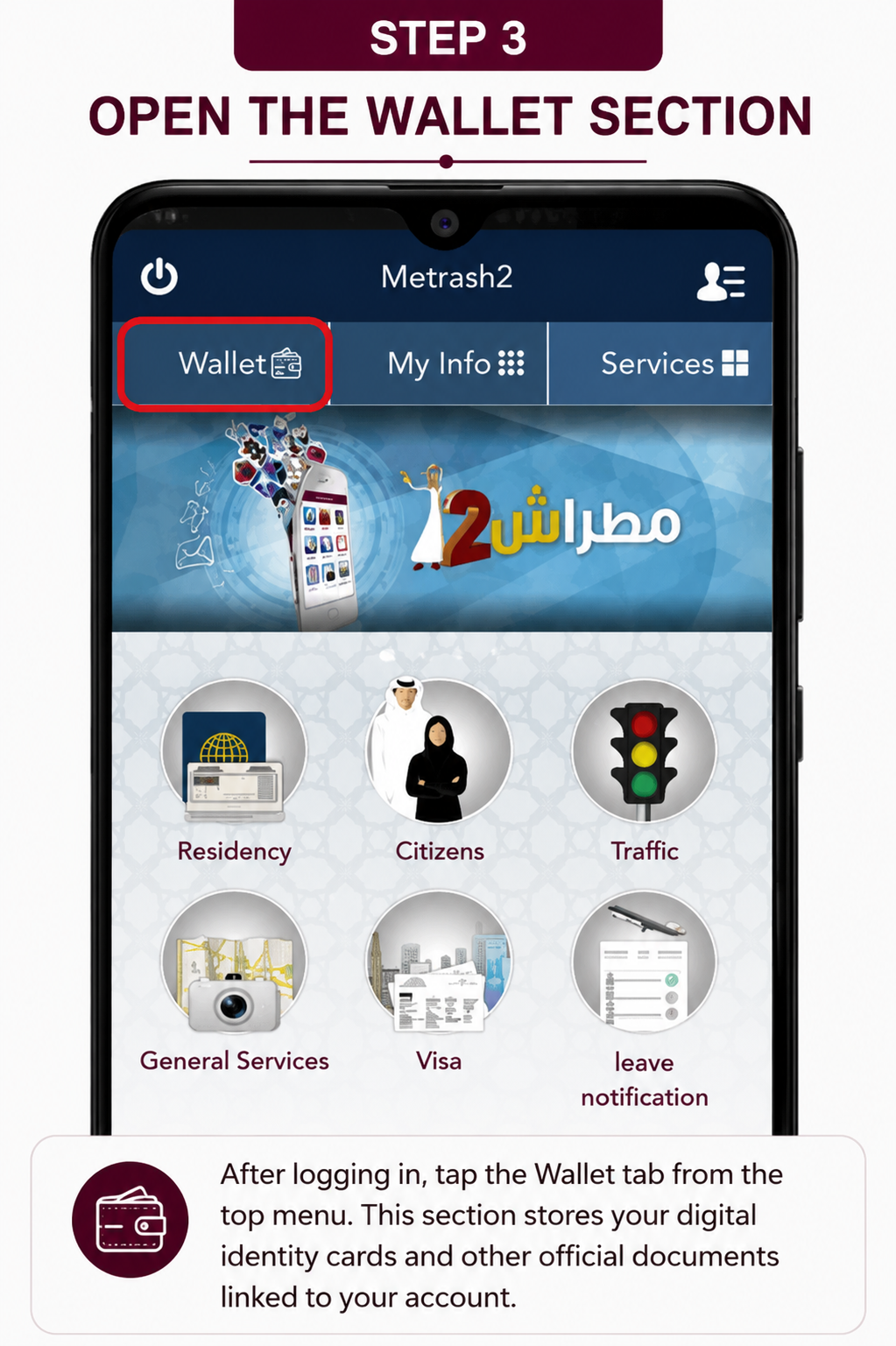
Step 3: Open the Wallet Section
After logging in, tap the Wallet tab from the top menu. This section stores your digital identity cards and other official documents linked to your account.
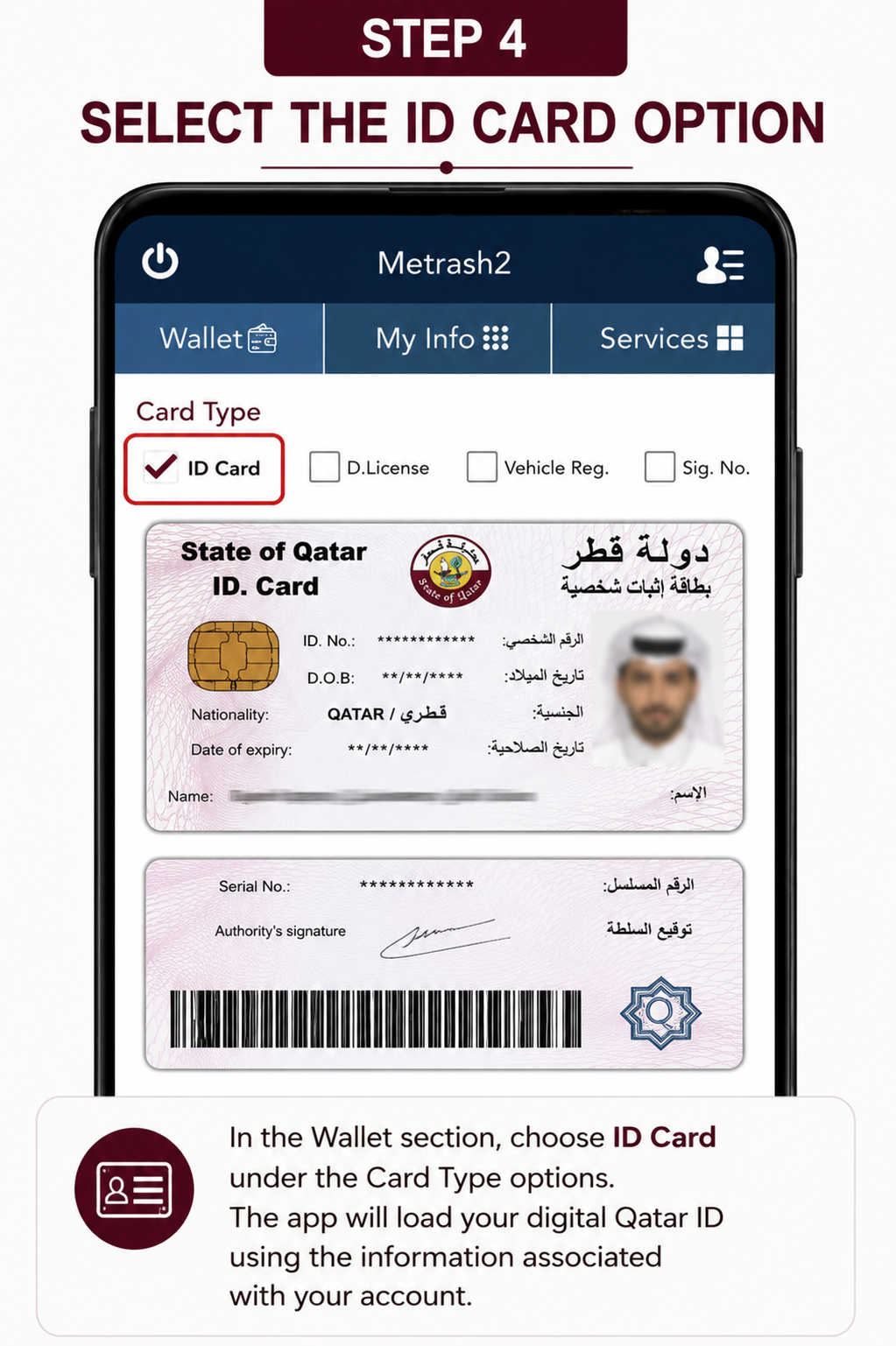
Step 4: Select the ID Card Option
In the Wallet section, choose ID Card under the Card Type options. The app will load your digital Qatar ID using the information associated with your account.
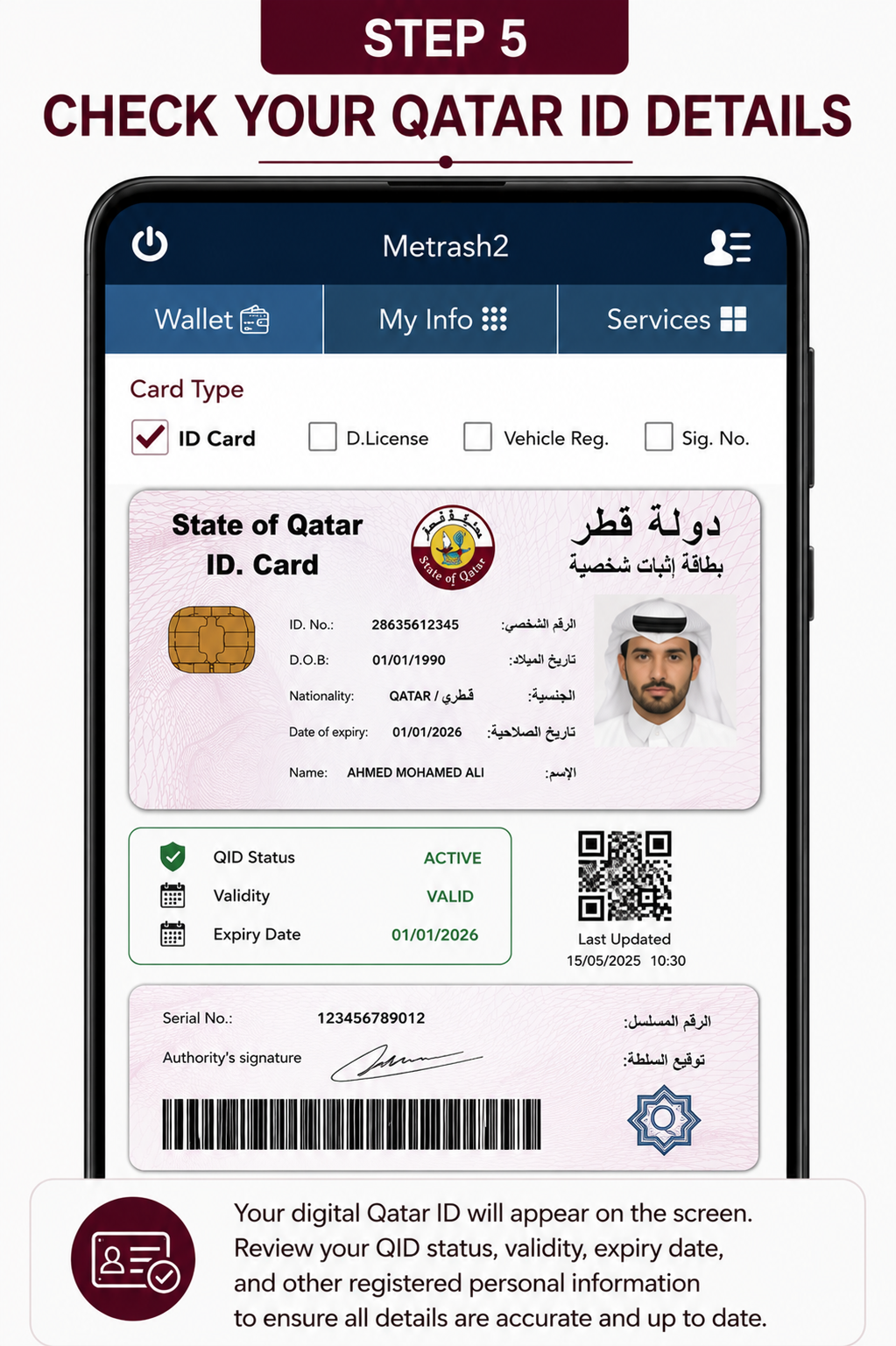
Step 5: Check Your Qatar ID Details
Your digital Qatar ID will appear on the screen. Review your QID status, validity, expiry date, and other registered personal information to ensure all details are accurate and up to date.
MOI Website or Metrash: Which Should You Use?
Both platforms connect to official Ministry of Interior records and provide reliable information. The MOI website works well on desktop and mobile browsers, making it convenient for quick inquiries without installing an application. Metrash offers a more personalized experience for registered residents, with additional services and notifications available after signing in.
For a simple Qatar ID check, either platform can provide the information you need. If you regularly manage residency services, renew official documents, or track government applications, Metrash can save time by keeping those services in one place.
#4: Offline Methods to Check Qatar ID
Although the MOI Qatar portal and Metrash app provide the fastest way to verify your Qatar ID, you can also check your QID status through several offline methods. These options are helpful if you do not have internet access or need assistance directly from the Ministry of Interior.
Check Qatar ID via SMS Service
The Ministry of Interior offers an SMS service that allows residents to receive basic Qatar ID information on their mobile phones.
How to Use the SMS Service
If the request is successful, you may receive information such as:
Note: Your mobile number should be registered with the Ministry of Interior to use this service. SMS availability may vary depending on your mobile network and MOI service updates.
Visit an MOI Service Centre
If you need in-person assistance, you can visit any authorized Ministry of Interior (MOI) Service Centre across Qatar.
This option is useful when:
Bring the following documents with you:
An MOI representative will verify your identity and assist you with your inquiry or application.
Contact the MOI Telephone Hotline
You can also contact the Ministry of Interior Qatar by phone to inquire about your Qatar ID status or receive guidance on residency-related services.
MOI Helpline Numbers
Before calling, keep your Qatar ID number or passport number ready, as the representative may request it to verify your identity.
The hotline can assist with:
Tip: For faster assistance, call during official Ministry of Interior working hours and have your identification details ready before speaking with a representative.
Qatar ID Validity Check
Checking your Qatar ID validity helps confirm that your residence permit remains active and that you can continue using government and private services without interruption. The Ministry of Interior (MOI Qatar) allows residents to verify the validity of their Qatar ID online through its official inquiry services. Performing a quick validity check before travelling, renewing documents, changing jobs, or completing official transactions can help prevent unnecessary delays.
What Is Qatar ID Validity?
Qatar ID validity refers to the period during which your QID and residence permit (RP) remain legally active. Every Qatar ID includes a validity period that begins on the date of issuance or renewal and ends on the expiry date shown in the Ministry of Interior records.
A valid Qatar ID confirms that your residency remains active and that your personal information is correctly recorded in the government’s database.
Why Should You Check Your Qatar ID Validity?
Regularly checking your Qatar ID validity helps you stay informed about your residency status and avoid issues during official procedures.
A validity check allows you to:
- Confirm your residence permit is active.
- Verify your Qatar ID has not expired.
- Review your registered personal information.
- Prepare for renewal before the expiry date.
- Avoid delays when using government services.
- Complete banking and employment procedures without interruption.
- Confirm your official records are up to date.
How to Check Qatar ID Validity Online
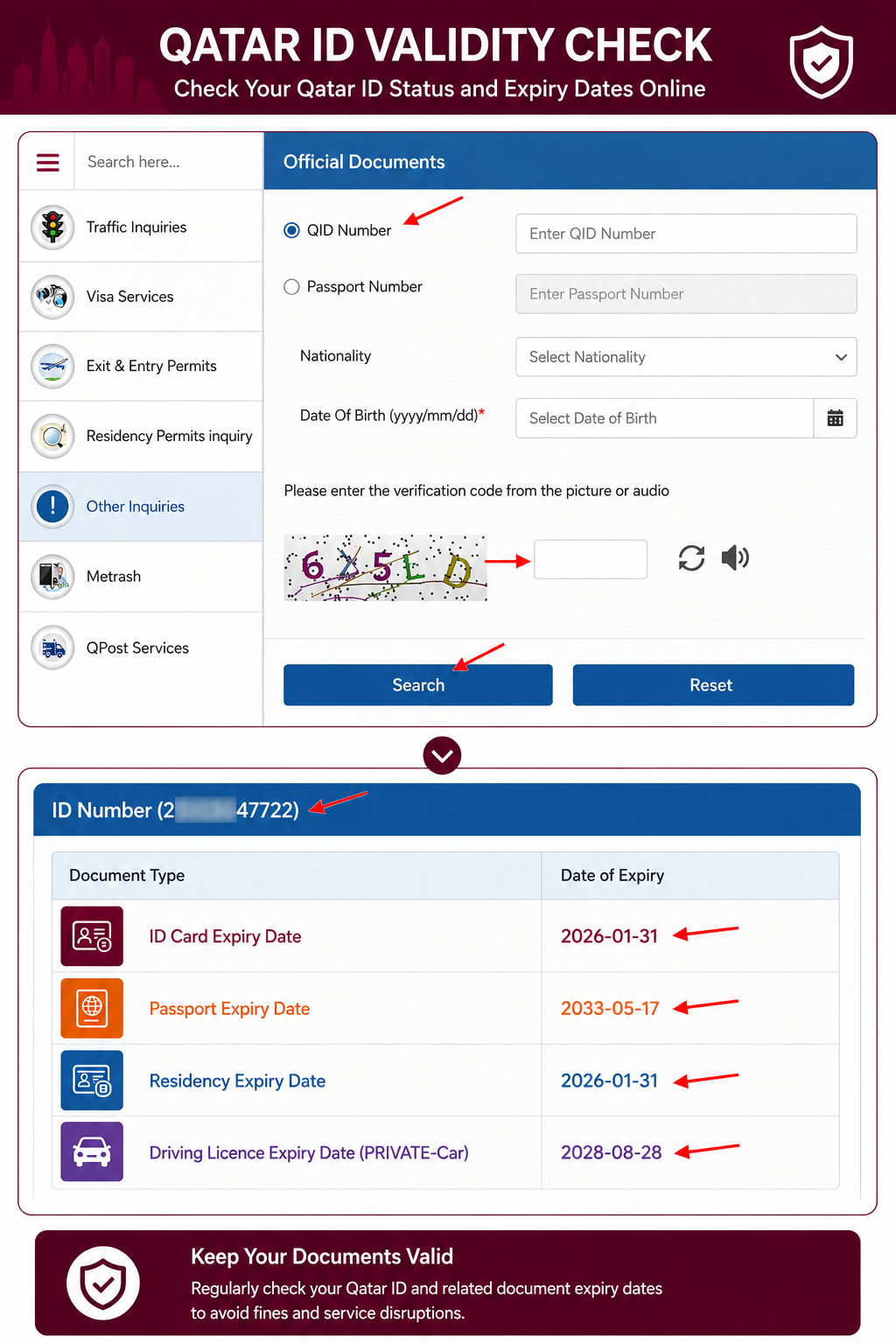
Visit the official MOI Qatar Official Documents Inquiry page. You can directly visit this page by following this URL (https://portal.moi.gov.qa/wps/portal/MOIInternet/services/inquiries/others/officialdocuments). Select the QID Number option. You can also choose Passport Number if you want to search using your passport details. Enter your 11-digit Qatar ID (QID) number in the required field. Complete the CAPTCHA verification by entering the security code shown on the screen. Click the Search button to submit your request. Review your official document information, including:
- Qatar ID Expiry Date
- Passport Expiry Date
- Residence Permit Expiry Date
- Driving Licence Expiry Date (if applicable)
Check the displayed expiry dates and renew any document before it expires to maintain uninterrupted access to government and private services.
What Happens If Your Qatar ID Is No Longer Valid?
If your Qatar ID has expired or is no longer active, you may experience restrictions when accessing government and private services. Depending on your circumstances, you may need to renew your residence permit, update your records, or contact the Ministry of Interior to resolve the issue.
Qatar ID Renewal
Renewing your Qatar ID (QID) helps keep your Residence Permit (RP) valid and ensures your residency information remains up to date in the Ministry of Interior (MOI Qatar) database. Completing the renewal before your Qatar ID expires helps prevent interruptions when accessing government services, banking, healthcare, employment, telecommunications, and other essential services.
Eligible residents can renew their Qatar ID through the official MOI Portal, the Metrash app, or authorized MOI Service Centres, depending on their residency category and eligibility.
When Should You Renew Your Qatar ID?
You should begin the renewal process before your Qatar ID reaches its expiry date. Renewing early provides enough time for document verification and approval, helping you avoid delays in official transactions.
A timely renewal also helps maintain uninterrupted access to:
Who Can Renew a Qatar ID?
Qatar ID renewal is available to residents whose Residence Permit qualifies for renewal under Qatar’s immigration regulations.
Depending on the residency category, the application may be submitted by:
The available renewal method may vary depending on the applicant’s residency status.
Documents Required for Qatar ID Renewal
The Ministry of Interior may request different documents based on the type of residence permit and residency category.
Commonly required documents include:
Always review the latest requirements before submitting your application.
How to Renew Qatar ID Online
Can you renew a Qatar ID offline?
Yes. Residents who cannot complete the renewal online may visit an authorized MOI Service Centre for assistance.
Bring your:
An MOI representative will review your application and guide you through the remaining steps.
How Long Does Qatar ID Renewal Take?
Processing times vary depending on:
Applications submitted through official Ministry of Interior channels are processed after successful verification of the required information.
QID Tracking
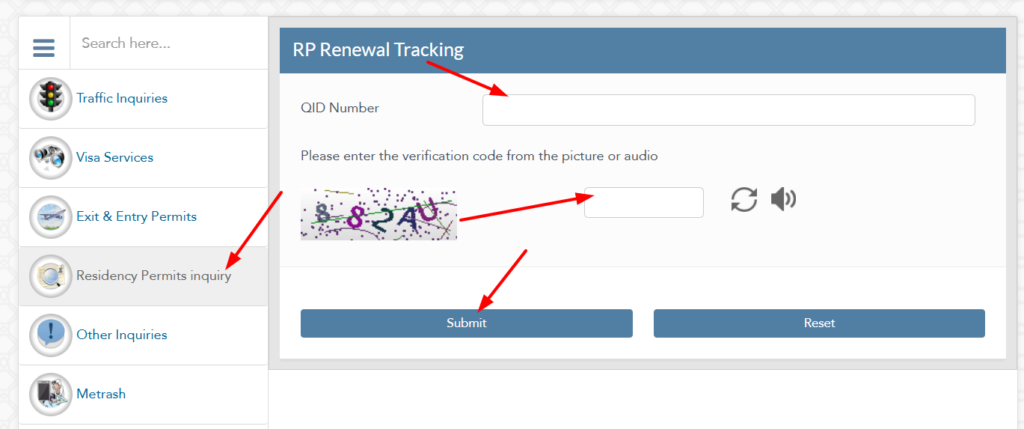
After submitting a Qatar ID application or Qatar ID renewal request, you can track its progress through the official Ministry of Interior (MOI Qatar) services. The RP Renewal Tracking service allows residents to monitor their application in real time, making it easy to check the latest updates without visiting an MOI Service Centre.
Whether you have applied for a new Qatar ID, renewed your residence permit, or are waiting fo
What Can You Track?
Depending on your application, you can monitor several stages of the process, including:
- New Qatar ID applications
- Qatar ID renewal requests
- Residence Permit (RP) renewal status
- Application verification
- Document verification
- Application approval
- Card printing progress
- Ready for collection status
- QPost delivery status (if applicable)
- Completed applications
Requirements Before Tracking Your Application
Before using the RP Renewal Tracking service, make sure you have:
- Your 11-digit Qatar ID (QID) number
- A stable internet connection
- Access to the official MOI Qatar website
- The CAPTCHA verification code displayed on the tracking page
How to Track Qatar ID Status Online
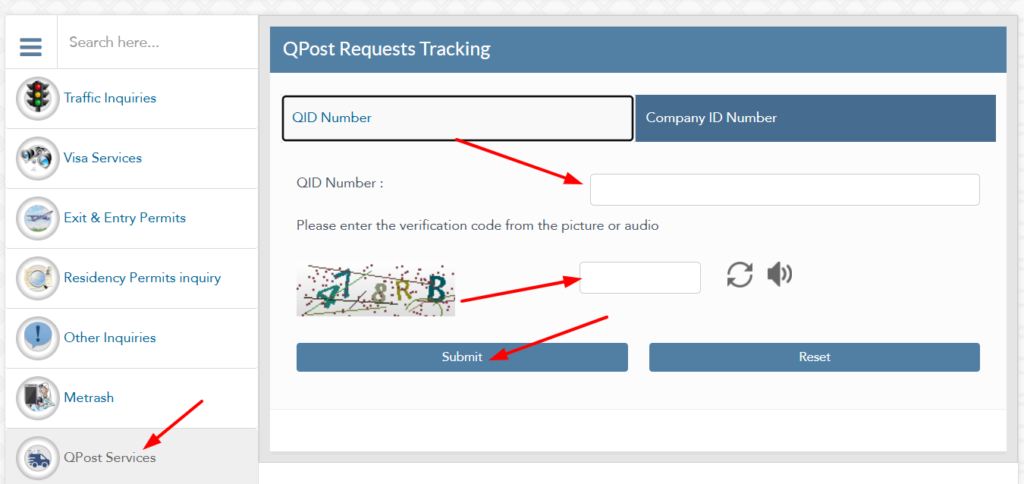
If you selected QPost delivery during your Qatar ID application or renewal, you can track the delivery status online through the official MOI Qatar QPost Requests Tracking service.
Why Should You Track Your Qatar ID Application?
Regularly checking your application status helps you:
Qatar ID Status Meanings
The Ministry of Interior displays different status messages during Qatar ID inquiries and application tracking. Understanding these messages helps you know whether any action is required.
Status | Meaning | Recommended Action |
|---|---|---|
Active | Qatar ID is valid and fully operational. | No action required. |
Valid | Residence permit remains valid. | Continue using your QID normally. |
Pending | Application is awaiting processing. | Wait for further updates. |
Under Review | Documents are being verified. | Monitor your application status. |
Approved | Application has been accepted. | Wait for printing or delivery. |
Printing | Qatar ID card is being produced. | No action required. |
Ready for Collection | Card is available for collection. | Visit the designated collection point if instructed. |
Delivered | Qatar ID has been successfully delivered. | Confirm your details after receiving the card. |
Expired | Validity period has ended. | Begin the renewal process immediately. |
Rejected | Application was not approved. | Review the reason and follow MOI instructions. |
Cancelled | Application has been cancelled. | Contact the Ministry of Interior if necessary. |
Common Reasons Why Qatar ID Cannot Be Found
Sometimes the Ministry of Interior portal may not return a Qatar ID record. In most cases, this does not indicate a permanent problem and can often be resolved by reviewing the information entered.
Incorrect Qatar ID Number
Entering even one incorrect digit can prevent the system from locating your record. Always compare the number with your physical or digital Qatar ID before submitting your inquiry.
Incorrect Passport Information
When checking by passport number, make sure the passport number and nationality match your official records.
Recently Submitted Application
New applications or recent renewals may take some time to appear in the Ministry of Interior database. Waiting a short period before checking again often resolves the issue.
Temporary System Maintenance
The MOI portal or Metrash app may occasionally undergo scheduled maintenance or technical updates. During these periods, some inquiry services may be temporarily unavailable.
Residence Permit Still Under Processing
If your residence permit has not yet been approved, your Qatar ID information may not appear until the residency process is complete.
Browser or Network Issues
A slow internet connection, outdated browser, or temporary network problem can interrupt the inquiry process. Refresh the page, clear your browser cache, or try another browser before submitting a new request.
Outdated Government Records
In rare cases, recently updated information may take time to synchronize across government systems. If your record remains unavailable after multiple attempts, contact the Ministry of Interior (MOI Qatar) or visit an authorized MOI Service Centre for assistance.
Employer Verification
Employers in Qatar often verify a worker’s Qatar ID (QID) to confirm identity, residency status, and employment records before completing official procedures. Since the Qatar ID is linked to the Ministry of Interior (MOI) database, it helps employers ensure that an employee’s residence permit remains valid and that the registered information matches government records.
Why Do Employers Verify Qatar ID?
Employer verification supports compliance with Qatar’s labour and immigration regulations. It also helps organizations maintain accurate employee records and complete government-related transactions efficiently.
Common reasons for employer verification include:
Information Employers Can Verify
Depending on their authorization and the government service being used, employers may verify:
Employers should always follow Qatar’s privacy laws and use official government channels when verifying employee information.
Sponsor Verification
Sponsors play an important role in managing residency matters for eligible residents. In many cases, sponsors can verify a resident’s Qatar ID information through official MOI Qatar services to ensure residency records remain accurate.
When Is Sponsor Verification Needed?
Sponsors may verify Qatar ID details when:
How Sponsors Can Verify Qatar ID
Sponsors can generally verify residency information through:
The available information depends on the sponsor’s authorization and the service being used.
Official MOI Services Related to Qatar ID
The Ministry of Interior (MOI Qatar) offers several online services that work alongside the Qatar ID system. These services allow residents to manage residency, immigration, identity verification, and other official records through secure government platforms.
MOI Service | Purpose |
|---|---|
Official Documents Inquiry | Verify Qatar ID and official document information. |
Qatar ID Check | Check QID status, validity, and expiry date. |
Residence Permit Services | Manage residence permit applications and renewals. |
Visa Inquiry | View visa information and application status. |
Visa Approval Tracking | Monitor visa processing progress. |
QID Renewal | Renew an eligible Qatar ID online. |
Metrash Services | Access government services through the official mobile app. |
Traffic Services | View traffic violations and vehicle-related services. |
Driving Licence Services | Manage driving licence inquiries and renewals. |
Exit Permit Services | Access eligible exit permit information where applicable. |
Official Certificates | Verify selected government-issued documents. |
Qatar ID vs Residence Permit
Although the terms Qatar ID and Residence Permit (RP) are often used together, they refer to different parts of the residency process.
The Residence Permit gives a foreign national legal permission to live and work in Qatar, while the Qatar ID serves as the official identification card issued after residency approval.
Qatar ID | Residence Permit |
|---|---|
Physical identity card | Legal residency authorization |
Used as daily identification | Grants permission to reside in Qatar |
Contains QID number and personal details | Linked to immigration records |
Required for many government and private services | Forms the legal basis for QID issuance |
Issued by the Ministry of Interior | Approved by the Ministry of Interior |
Qatar ID vs Passport
Although both documents verify identity, they serve different purposes. A passport confirms your nationality and identity internationally, while the Qatar ID confirms your legal residency within Qatar.
Qatar ID | Passport |
|---|---|
Issued by the Ministry of Interior | Issued by your country of citizenship |
Used inside Qatar | Used for international travel |
Confirms residency status | Confirms nationality and identity |
Contains a unique QID number | Contains a passport number |
Required for many local services | Required for immigration and border control |
MOI Portal vs Metrash
The Ministry of Interior provides both a web portal and the Metrash mobile application. While both connect to the same official government database, each platform offers a different user experience.
MOI Portal | Metrash |
|---|---|
Accessible through a web browser | Available as a mobile application |
No app installation required | Requires registration and login |
Suitable for desktop and mobile browsers | Optimized for smartphones |
Provides official inquiry services | Provides inquiry services and additional account features |
Useful for occasional checks | Ideal for frequent government transactions |
Supports official document inquiries | Supports notifications and personalized services |
If you only need a quick Qatar ID check, the MOI portal is usually sufficient. For regular access to government services, application tracking, and account management, Metrash provides additional convenience.
Qatar ID Number Structure
Every Qatar ID includes a unique 11-digit identification number assigned by the Ministry of Interior (MOI Qatar). This number acts as the primary identifier for your residency records and remains linked to your official government profile.
The Qatar ID number is used across many government and private sector services, making it one of the most important pieces of personal identification for residents.
Where Can You Find Your Qatar ID Number?
Your QID number appears on:
What Is the Qatar ID Number Used For?
Your Qatar ID number is commonly required when you need to:
Tips for Protecting Your Qatar ID Number
Because your Qatar ID number is linked to your official government records, it should be handled carefully.
Follow these best practices:
Protecting your Qatar ID number helps safeguard your personal information and reduces the risk of unauthorized access to your official records.
Security Tips for Checking Qatar ID Online
Checking your Qatar ID (QID) online is safe when you use official government platforms. Since your Qatar ID contains sensitive personal and residency information, taking a few precautions can help protect your identity and prevent unauthorized access.
Use Only Official Government Platforms
Always verify your Qatar ID through the official Ministry of Interior (MOI Qatar) website or the Metrash app. Avoid third-party websites that request unnecessary personal information or login credentials.
Verify the Website Address
Before entering your Qatar ID number or passport details, confirm that you are visiting the official MOI website. Look for a secure connection (HTTPS) and verify the website address to reduce the risk of phishing websites.
Protect Your Personal Information
Never share your:
Government officials will never ask for your password through email, SMS, or phone calls.
Avoid Public Wi-Fi
If possible, avoid checking your Qatar ID while connected to unsecured public Wi-Fi networks. Use a trusted internet connection or your mobile data when accessing government services.
Keep Your Devices Secure
Protect your phone, tablet, or computer by:
Log Out After Completing Your Inquiry
If you access your Qatar ID information from a shared or public device, always sign out of your account and close the browser after completing your inquiry.
Troubleshooting Qatar ID Check Issues
Occasionally, you may encounter problems while checking your Qatar ID online. Most issues can be resolved without visiting a Ministry of Interior service centre.
Qatar ID Not Found
If the system cannot locate your Qatar ID:
Invalid Passport Number
When checking by passport number:
CAPTCHA Verification Failed
If the security code is incorrect:
Website Is Not Loading
If the MOI portal does not open:
Session Expired
Government websites automatically end inactive sessions for security reasons.
Simply reload the page and submit a new inquiry.
Metrash Login Problems
If you cannot access the Metrash app:
Incorrect Personal Information
If your Qatar ID displays incorrect information, contact the Ministry of Interior (MOI Qatar) or visit an authorized MOI Service Centre for assistance.
Qatar ID Check Methods
Method | Online | Official | Best For |
|---|---|---|---|
MOI Portal | ✔ | ✔ | Quick Qatar ID checks |
Passport Number | ✔ | ✔ | Checking without QID |
Metrash App | ✔ | ✔ | Registered residents |
SMS Service | ✔ | ✔ | Basic status inquiries |
MOI Service Centre | ✘ | ✔ | In-person assistance |
MOI Helpline | ✘ | ✔ | General inquiries |
Documents Required for Qatar ID Renewal
Document | Required |
|---|---|
Qatar ID | ✔ |
Passport | ✔ |
Residence Permit Details | ✔ |
Supporting Documents (if requested) | ✔ |
Renewal Fee | ✔ |
Official Platforms
Platform | Purpose |
|---|---|
MOI Portal | Qatar ID inquiries and government services |
Metrash | Mobile access to MOI services |
MOI Service Centre | In-person assistance |
MOI Helpline | Telephone support |
Common Mistakes When Checking Qatar ID
Small errors can prevent the system from displaying your Qatar ID information. Avoid these common mistakes when using the official inquiry services.
Entering the Wrong Qatar ID Number
A single incorrect digit can return an error or display no results. Always double-check your QID before submitting your request.
Using an Expired Passport
When checking by passport number, use your current passport details. Old or incorrect passport information may prevent the system from locating your record.
Selecting the Wrong Nationality
If the inquiry requires your nationality, ensure it matches the information registered with the Ministry of Interior.
Ignoring the CAPTCHA
The CAPTCHA is required to protect government systems. Complete it carefully before submitting your inquiry.
Using Unofficial Websites
Only use the official Ministry of Interior website or the Metrash app. Avoid websites that ask for unnecessary personal information or promise unofficial verification services.
Waiting Until the Last Minute to Renew
Do not wait until your Qatar ID expires before starting the renewal process. Early renewal helps avoid interruptions to important government and private services.
Best Practices for Managing Your Qatar ID
Following a few simple habits can help you keep your Qatar ID information accurate and avoid unnecessary delays.
These practices help ensure that your residency records remain current and reduce the likelihood of problems during official transactions.
Related Government Services
The Ministry of Interior provides several additional online services that residents frequently use alongside Qatar ID inquiries. Accessing these services through official government platforms helps ensure accurate information and secure transactions.
Some of the most commonly used services include:
Using these related services together with regular Qatar ID checks helps residents manage their official records more efficiently and stay informed about their residency status.
Frequently Asked Questions
How can I check my Qatar ID online?
You can check your Qatar ID online through the official Ministry of Interior (MOI Qatar) website or the Metrash app. On the MOI portal, navigate to the Official Documents Inquiry service, enter your Qatar ID number, complete the CAPTCHA verification, and submit your request. The system will display your current Qatar ID status, validity, expiry date, and other official information. Always use official government platforms to ensure the information is accurate and secure.
Can I check my Qatar ID using my passport number?
Yes. The Ministry of Interior provides an option to check certain residency-related information using your passport number instead of your Qatar ID number. This method is useful if you do not have your QID available or want to verify information linked to your passport. Enter your passport number and any additional information requested by the official MOI inquiry service to retrieve available records.
Is the MOI Qatar ID check free?
Yes. The MOI Qatar ID Check service is available free of charge through the official Ministry of Interior website and the Metrash app. You do not need to pay any fee to verify your Qatar ID status, validity, or expiry date online. Be cautious of unofficial websites that request payment or personal information for basic inquiry services.
What information appears after checking my Qatar ID?
The information displayed depends on your official government records. In most cases, you can view your Qatar ID status, validity, expiry date, registered name, nationality, occupation, and residency information. Some inquiry services may also display the current status of your residence permit or official document verification results. Always compare the displayed information with your physical Qatar ID to ensure everything is accurate.
Why can't I find my Qatar ID online?
Several factors can prevent your Qatar ID from appearing in the inquiry results. Common reasons include entering an incorrect QID number, using the wrong passport information, recent updates that have not yet synchronized with government systems, or temporary maintenance on the MOI website. If the issue continues after verifying your information, contact the Ministry of Interior or visit an authorized MOI Service Centre.
How often should I check my Qatar ID status?
There is no mandatory schedule for checking your Qatar ID. It is a good practice to verify your status before renewing your residence permit, travelling, changing employers, applying for government services, or completing important financial transactions. Regular checks also help identify any unexpected issues before they affect your daily activities.
What does an Active Qatar ID status mean?
An Active status means your Qatar ID and associated residence permit are currently valid. Your personal information is recognized by the Ministry of Interior, and you can continue using government and private services that require a valid Qatar ID. No immediate action is usually required unless your expiry date is approaching.
What does an Expired Qatar ID status mean?
An Expired status indicates that your Qatar ID validity period has ended. Depending on your residency category, you may need to renew your Qatar ID or residence permit to continue accessing certain government and private services. Check your renewal eligibility through the official MOI portal or contact your employer or sponsor for guidance.
How long is a Qatar ID valid?
The validity period of a Qatar ID depends on the residency category and the approval granted by the Ministry of Interior. The expiry date is displayed on both the physical Qatar ID and the official government records. Residents should always check this date and begin the renewal process before the current validity period ends.
Can I renew my Qatar ID online?
Yes. Eligible residents can renew their Qatar ID online using the official MOI Qatar portal or the Metrash app. The renewal process typically involves verifying personal information, submitting any required documents, paying the applicable renewal fee, and tracking the application until it is approved. Online renewal saves time and reduces the need to visit a service centre.
What documents are required for Qatar ID renewal?
The required documents vary depending on your residency category. In most cases, you will need your current Qatar ID, a valid passport, residence permit information, and any additional supporting documents requested by the Ministry of Interior. Some applications may also require payment of the applicable renewal fee before processing begins.
How can I track my Qatar ID application?
You can track your Qatar ID application through the official Ministry of Interior website or the Metrash app. After submitting your application or renewal request, use the appropriate inquiry service to monitor its progress. Depending on the stage of processing, you may see statuses such as Submitted, Under Review, Approved, Printing, or Ready for Collection.
Can I check my Qatar ID on my mobile phone?
Yes. You can check your Qatar ID using any modern smartphone. The official MOI Qatar website is mobile-friendly, and the Metrash app provides convenient access to Qatar ID inquiries, residency services, and other government transactions. A stable internet connection is recommended for the best experience.
Is Metrash the same as the MOI website?
No. Both platforms are operated by the Ministry of Interior, but they serve different purposes. The MOI website is a web-based portal that provides government inquiry services through a browser, while Metrash is the official mobile application offering additional account-based services, notifications, and digital access to selected government transactions.
What should I do if my Qatar ID details are incorrect?
If you notice incorrect personal information after checking your Qatar ID, contact the Ministry of Interior as soon as possible. Depending on the issue, you may need to visit an authorized MOI Service Centre and provide supporting documents to request a correction. Do not ignore incorrect information, as it may affect future government transactions.
Can employers verify my Qatar ID?
Yes. Employers may verify certain Qatar ID and residency information through authorized government services when completing employment-related procedures. This helps confirm your identity, residence permit validity, and official employment records. Employers should always use official Ministry of Interior channels and comply with Qatar's privacy and labour regulations.
Is my Qatar ID linked to my residence permit?
Yes. Your Qatar ID is directly linked to your Residence Permit (RP) and official immigration records maintained by the Ministry of Interior. When your residence permit is approved or renewed, the associated Qatar ID information is updated accordingly. This connection allows residents to verify their residency status through official MOI inquiry services.
Can I use an expired Qatar ID?
An expired Qatar ID may not be accepted for many government or private services. Depending on the service, you may be required to renew your residence permit and Qatar ID before completing official procedures. If your QID has expired, begin the renewal process promptly to avoid unnecessary interruptions or administrative delays.
How can I protect my Qatar ID information?
Treat your Qatar ID as confidential personal information. Use only the official MOI Qatar website or Metrash app to check your status. Never share your Qatar ID number, passwords, or One-Time Password (OTP) with unauthorized individuals. Keep your physical Qatar ID secure, verify website addresses before entering personal information, and report a lost or stolen card to the appropriate authorities without delay.
Conclusion
Your Qatar ID is one of the most important documents you will use while living in Qatar. It confirms your legal residency, supports identity verification, and provides access to a wide range of government and private services. Keeping your Qatar ID valid and checking its status regularly can help prevent unnecessary delays when completing employment, banking, healthcare, immigration, and other official procedures.
The Ministry of Interior (MOI Qatar) offers several reliable ways to verify your Qatar ID, including the MOI portal, passport number inquiry, Metrash app, SMS service, and MOI Service Centres. By using these official channels and following the best practices outlined in this guide, you can easily monitor your QID status, validity, expiry date, and renewal progress while ensuring your residency information remains accurate and up to date.
